

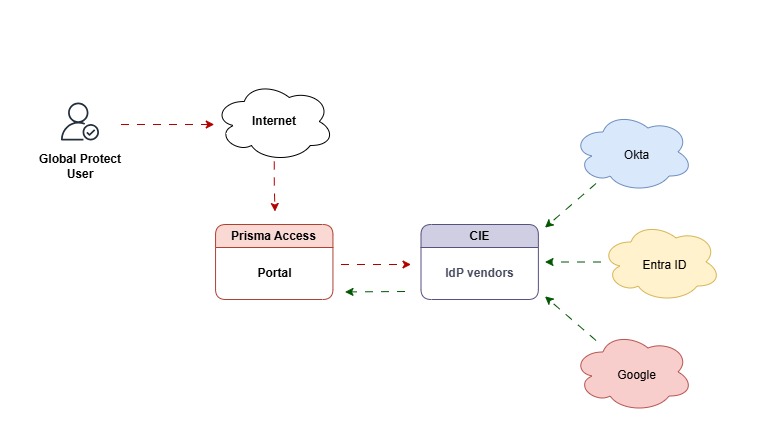
What’s Palo Alto Cloud Identity?
It is a central hub that connects all your identity providers, such as Okta, Entra, and Google, to your Palo Alto firewalls.
Instead of setting things up separately for each provider, you can easily link them all through Cloud Identity. This makes the authentication process smoother and more convenient!
Use Case
If a business uses multiple apps or firewalls as multi-tenants, the IT team will need to connect each one separately to its IdPs, such as Azure AD, Okta, or Google. And that’s a lot of extra setup and headaches.
With CIE, you only connect to your login system (IdP) once. Then, CIE takes care of sharing the connection with the other tools.
What’s the Benefit of Cloud Identity?
- Use one login everywhere (SSO).
- Add MFA across apps and firewalls without reconfiguring SAML.
- Work with both cloud and on-prem systems simultaneously.
Here’s an example of a firewall without CIE
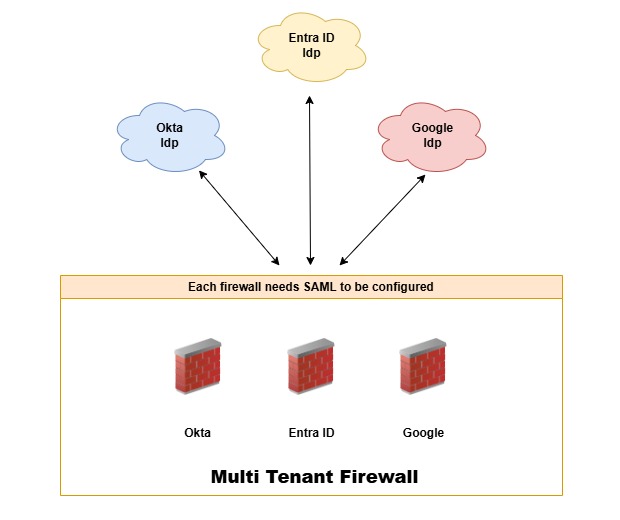
The Clouds:
These are the IdP providers that control user behaviors and simultaneously support MFA.
The Firewalls:
It is a multi-tenant environment with virtual firewalls (Vsys) with multiple Identity providers as main authenticators.
The Problem:
You will need to configure SAML so that every user authenticates via the IdP. This means that each firewall must have SAML authentication configured.
Here’s another example, but with CIE
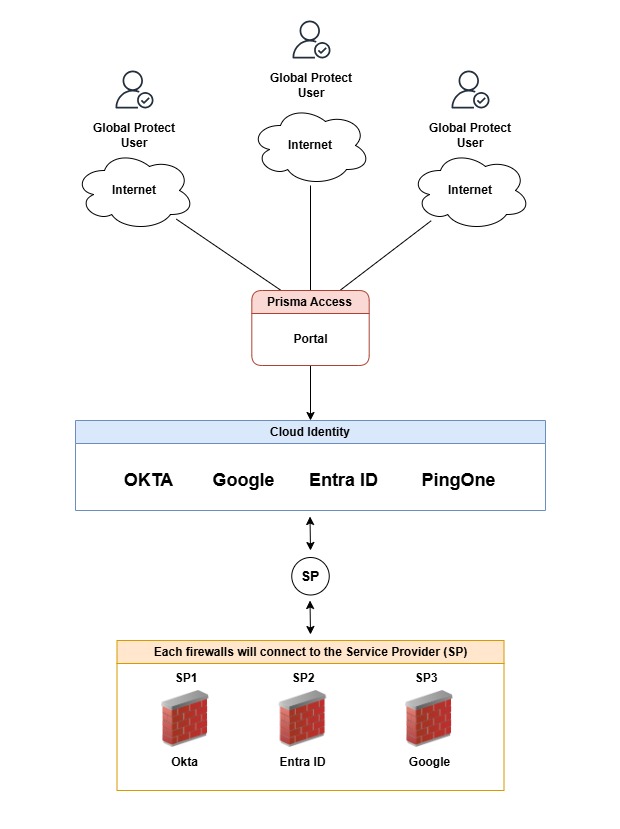
The Global Protect Users
Those users are trying to connect vpn to to either Prisma Access or Global Protect on-prem.
Prisma Access Portal
When the user attempts to connect to the portal, they will be redirected to Cloud Identity for authentication. At this point, the user will be prompted to authenticate using Okta, Google, Entra, or PingOne.
Remember, Cloud Identity has all the configuration from those providers.
Cloud Identity (The Broker)
This is Cloud Identity (CIE). It contains Okta, Entra ID, and Google as IdP providers that connect to the cloud identity service instead of directly accessing the firewall.
CIE then acts as a primary service provider (SP) broker for both firewalls and IdPs.
The firewalls
Lastly, each firewall will be authenticating against the Cloud Identity profile. This option will be shown in the firewall after CIE has been configured in the portal. Allowing you to pick any of the identities you’d like to use.
And here is the beauty. If you noticed, each firewall has a locally significant service provider (SP). This means that each firewall will connect to its own identity.
For example, SP1 connects to OKTA, SP2 connects to Google, and so on.
Here is the flow
A user wants to connect to a portal/gateway. Prisma redirects to CIE, which then redirects to Azure AD, where Azure enforces MFA with either Duo or any other MFA. Once successful, Azue returns a signed SAML assertion to CIE, and CIE brokers the assertion back to Prisma, and the user is in.
To clear things up, this is what the configuration will look like
- The clouds are IdP providers.
- CIE manages all the connections from the Idp vendors
- CIE becomes the Idp for the firewall acting as the service provider.
In a nutshell
Cloud Identity is a broker. All it does is simplify authentication by acting as the middleman between your identity providers, like Okta, Entra ID, Google, etc, and Prisma Access, or any Palo security services.
The benefit?
As I mentioned, it reduces complexity, centralizes identity management, and strengthens your security posture.
Need Help?
If you or your organization are having a little trouble getting this service up and running, don’t worry. We’re here to help! Just give us a call or send us a message, and we’ll be more than happy to help you get everything set up smoothly.
Cheers,