

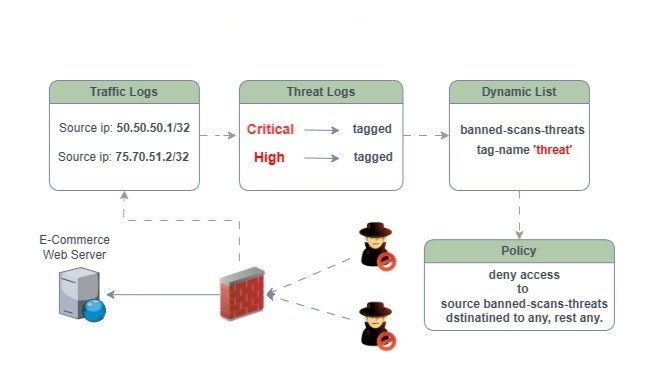
What’s Palo Alto Auto Tag?
Auto-tagging in Palo Alto firewalls is an advanced feature that automatically assigns tags to IP addresses or objects based on security events or conditions, without manual input. These tags can subsequently be used to enforce security policies dynamically.
In simpler terms, this feature makes it easy to gather any source IPs from outside linked to malicious activities into a Dynamic Address Group (DAG) based on the security events you select.
Here Is An Example
When a user attempts to connect to the internet from a host that has been compromised by malware or spyware, the firewall will automatically block the outbound connection. It does this by adding the offending IP address to a Dynamic Address Group (DAG) policy. This action occurs once a specific condition is met, and the logs will capture the corresponding signatures.
For this to occur, two components must align. A condition and an action.
The condition
Create an automated tag in the firewall that quarantines any IP address that triggers any security event.
The Action
If an event is triggered, send the offender’s IP address to a dynamic group that is blocked by a security policy. The security policy will have a deny action for both incoming and outgoing traffic.
To set this up, you need to configure your log profile and select your criteria. For instance, in my case, I’m choosing the threats as follows.
- If the severity is Critical, tag it.
- If the severity is High, tag it.
- If the severity is Medium, tag it.
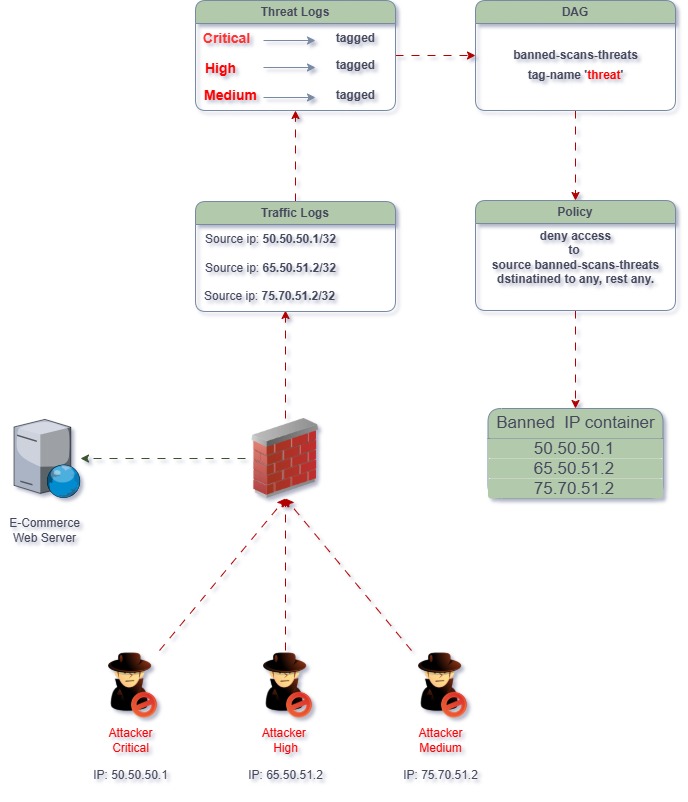
Let me explain what is happening in the image above.
- The three malicious users are using different attacks to infiltrate the web server.
- The firewall inspects the traffic, knows the attacker’s signatures, and triggers an event.
- The source IP is seen in the traffic logs.
- On the threat logs, the events are seen as follows (Critical, High, and Medium).
- Under the log profile, there’s a built-in action with a Tag named “threat”
- There’s a dynamic address group configured with the name of the tag.
- A security policy is created to deny any source coming from the DAG to any dest.
- Now, the DAG has a list of banned addresses.
The threat logs below indicate several significant threats: Critical and High.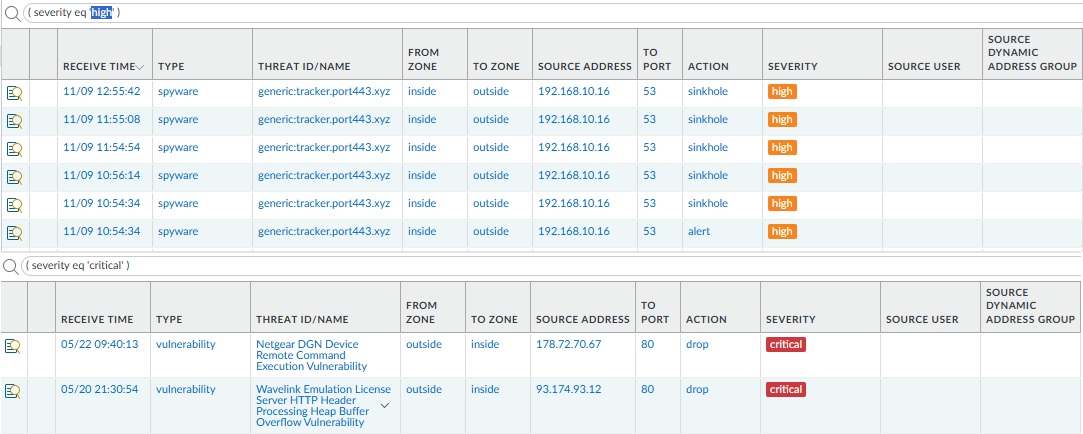
This is where the magic happens, once a threat is detected, the firewall automatically blocks the offending IP.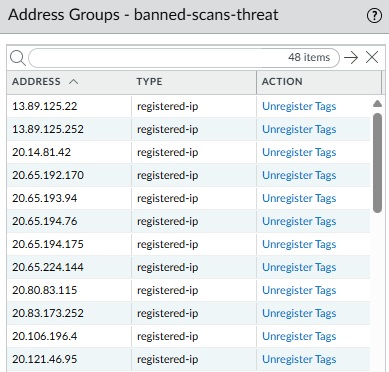
A security policy will be needed to deny traffic for both egress and ingress

How Auto-Tagging Works?
- A trigger event happens, such as detecting a threat.
- The firewall or Panorama automatically assigns a predefined tag.
- That tag is added to a dynamic address group (DAG).
- The DAG is used in a security policy to allow, block, or quarantine the traffic related to that tagged IP.
- The tag can be automatically removed after a specified time (timeout).
- It can get more advanced.
Pros of Auto-Tagging
- Dynamic Policy Enforcement: responds to events by updating security policies.
- Reduces Manual Work: Automatically tags IPs or users with no constant admin intervention
- Scales Well: This can be used in large environments.
- Lastly, it enhances the zero-trust posture.
Cons of Auto-Tagging
- Complexity in Setup: Sadly, it is not easy to implement. Requires well-thought-out policies.
- Risk of False Positives: Poorly configured log filters or thresholds may tag legitimate users or IPs.
- Tag Sprawl: Bad management hygiene could clutter the system.
- Limited to IP-Based Tagging: Dynamic Address Groups have a limit when it comes to tagging ips.
Need Help?
If you or your organization are having a little trouble getting this service up and running, don’t worry. We’re here to help! Just give us a call or send us a message, and we’ll be more than happy to help you get everything set up smoothly.
Cheers,